Features
Every feature of the book tracker
What ReadShelf does on iPhone, iPad and Apple Watch – and what’s part of Premium.
Add books
In your library, tap “+” and search by title, author or ISBN. The search checks several book databases, including Google Books, Open Library and national libraries, and brings in the cover, page count, publisher and genre. Use the camera to scan the barcode on the back; if a book isn’t in any database, enter it by hand.
- Progress per book in pages or percent
- Formats like paperback, hardcover, e-book or audiobook
- Series and similar books on the detail page
- iPhone

Shelves and library
Every book sits on a shelf: Reading, Read, Wishlist or Abandoned. Three custom shelves, such as “Book club” or “Vacation”, are free; with Premium you get as many as you like. View your library as a bookshelf with covers or as a list, searchable by title, author and ISBN.
Filtering by genre and author is free. Filtering by rating, year read and page count comes with Premium.
- iPhone

Reading sessions and timer
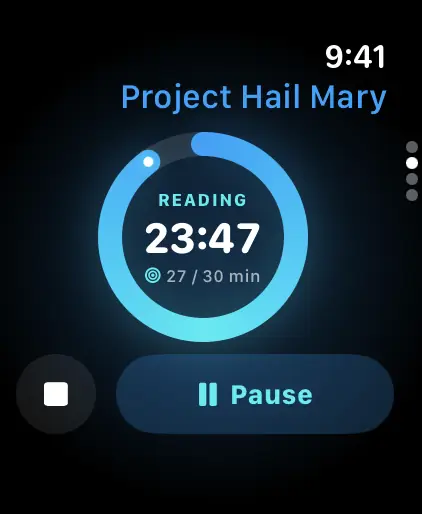
Tap “Session” to start the timer; when you stop, log the page you’re on. While you read, the timer shows on your Lock Screen and in the Dynamic Island. Forgot to time a session? Add it in the book with the day, duration and pages.
From your sessions, ReadShelf works out your pace in pages per day and per hour and estimates when you’ll finish the book.
- iPhone
- Apple Watch

Reading goal, streak and calendar
Choose how many books you want to read this year and how many minutes a day. The goal view shows how many books you’ve finished, whether you’re on track and what’s still waiting on your TBR. Your streak counts every reading day; every seven reading days earn a rest day, up to two.
The reading calendar shows the covers of the books you finished each month, and your year in review sums up your reading year to share. Some challenges and milestones are free, all of them come with Premium.
- iPhone

Reading stats
Stats are based on your reading sessions and finished books: pages, reading time, books and reading days. This week and last week are free. With Premium you see month, year and all time, plus your reading trend, genre breakdown, pace, ratings and personal records.
- iPhone

Quotes, notes and ratings
Save favorite passages right in the book. With the quote scan, take a photo of the page and pick just the lines you want to keep – text recognition runs on your device. Add notes, journal prompts for your reading journal and a rating once you’ve finished.
- iPhone
Discover
In Discover you search books worldwide and get suggestions based on your favorite genres and authors, including picks by mood like “light” or “gripping”. Suggestions are worked out on your device, using Apple Intelligence on supported devices.
- iPhone

Siri and reminders
Ask Siri to start, pause or end a reading session, log pages or tell you how much you’ve read today. ReadShelf can remind you to read if you like. Home Screen and Lock Screen widgets show your current book and streak with Premium; without Premium they show a preview.
- iPhone
Apple Watch
On your watch you start and pause reading sessions, log pages, see your daily goal and streak and pick a book from the list of books you’re reading. Complications put your daily goal right on your watch face.
Everything you log on your watch lands on your iPhone automatically, in your stats and reading goal.
- Apple Watch
Backup, import and export
Create and restore a backup file for free in Settings › Data & Backup; entries you already have aren’t duplicated. Bring your library over from Goodreads, StoryGraph or Fable with a CSV file. CSV export of books and reading sessions comes with Premium.
- iPhone
What’s on which device?
iPhone and Apple Watch compared. iPad does everything iPhone does.
| Feature | iPhone | Apple Watch |
|---|---|---|
| Start, pause, end reading sessions | available | available |
| Log pages | available | available |
| Daily goal and streak | available | available |
| Watch face complications | not available | available |
| Search books and scan barcodes | available | not available |
| Shelves and library | available | not available |
| Quotes and notes | available | not available |
| Live Activity | available | not available |
| Weekly stats | available | not available |
| Month, year and all-time stats | with Premium | not available |
| Sync through iCloud | with Premium | not available |
| Widgets | with Premium | not available |
✓ available · ✓ᴾ with Premium · – not available
Ready for your next book?
Download ReadShelf for free, scan the book you’re reading and start your first reading session.
 Coming soon toGoogle Play